
Details
What it does
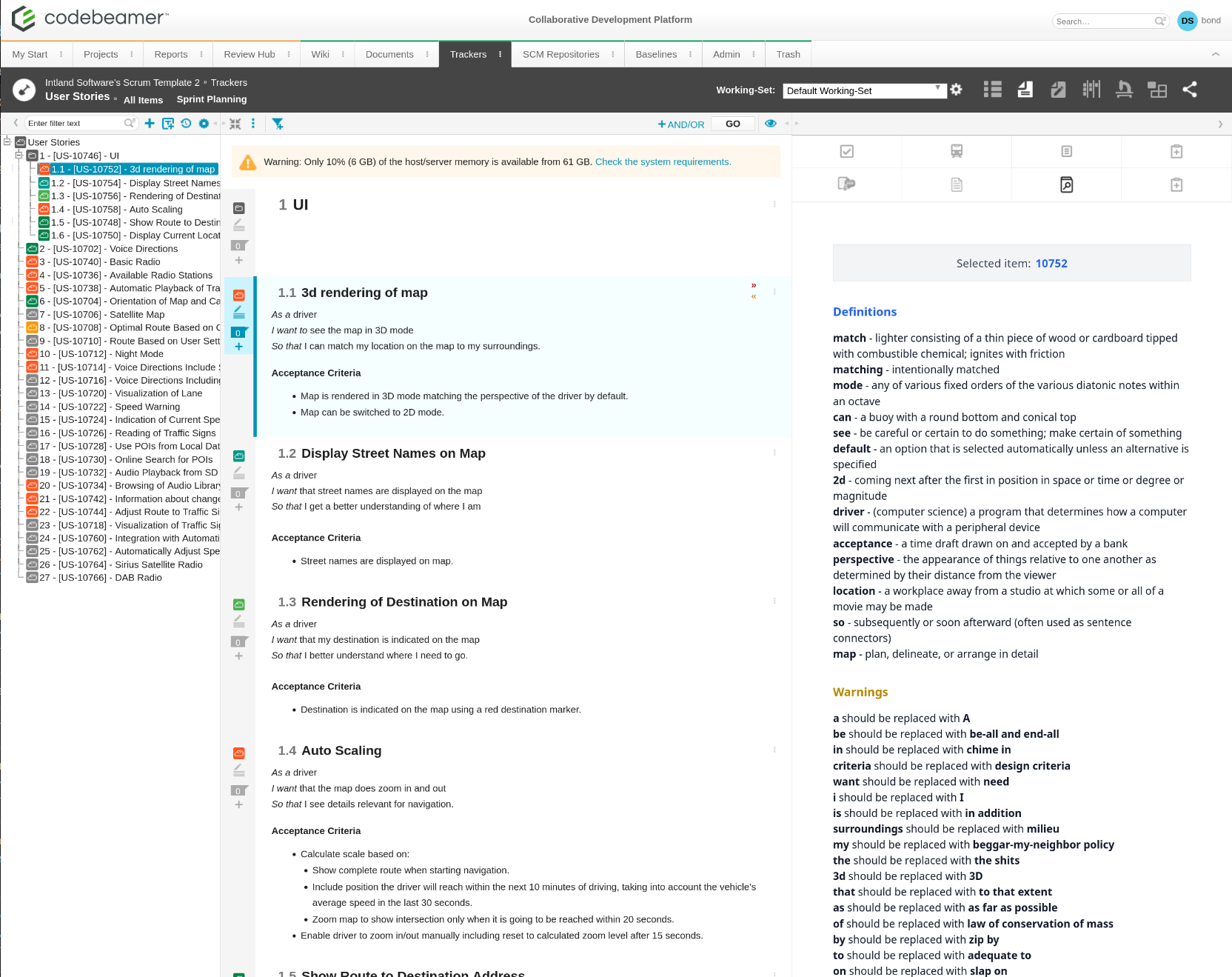
An external Codebeamer widget that scans selected tracker item descriptions, detects glossary terms (including synonyms), and shows definitions in a right-side panel backed by a configurable JSON or database glossary source.
Standardized terminology becomes searchable and reusable across trackers and wiki content. This helps large programs avoid inconsistent wording and makes requirement reviews faster and less ambiguous.
Key capabilities
-
Configurable glossary data source
- Supports glossary definitions sourced from a JSON file or a database
- Admin configuration schema for connection details (file path / connection string / credentials)
- Validation and error handling for misconfigured or unavailable sources
-
Glossary term management
- Add, edit, and delete glossary entries (term, definition, synonyms, and metadata)
- Synonym linking between terms to maintain a preferred canonical term
- Import/export options to support bulk updates
- Search and filtering in the management UI
-
External widget installation for Codebeamer
- Packaged as a Codebeamer-compatible external widget (manifest/registration + bootstrap)
- Handles authentication requirements for embedding into Codebeamer
- Installation documentation included
-
Automatic term detection
- Listens for tracker item selection events
- Extracts and analyzes description text
- Case-insensitive matching and robust handling of partial matches
- Performance optimizations for large descriptions, including caching of frequent matches
-
Right-side glossary panel
- Collapsible panel UI displaying matched terms and definitions
- Loading and empty states
- In-panel search and scrolling
- Resizable/minimizable layout for different working styles
-
Synonym awareness
- Detects when users use synonyms rather than the canonical term
- Maps synonym matches back to the preferred term
- Displays synonym relationships to guide consistent wording
Ideal for
Teams working with regulated or domain-heavy terminology (systems engineering, automotive, medical, aerospace, etc.) who want consistent vocabulary, faster comprehension during reviews, and less “what does this acronym mean?” back-and-forth.